Quota and paywall
Free users share a monthly allowance across chat and scans. Pro users can continue after reaching that allowance and can generate images.
| Free | Pro | |
|---|---|---|
| Chat messages and scans | freeMessagesPerMonth a month (10 by default) | Unlimited |
| Image generation | Not available | Available |
The allowance resets on the first of each calendar month.
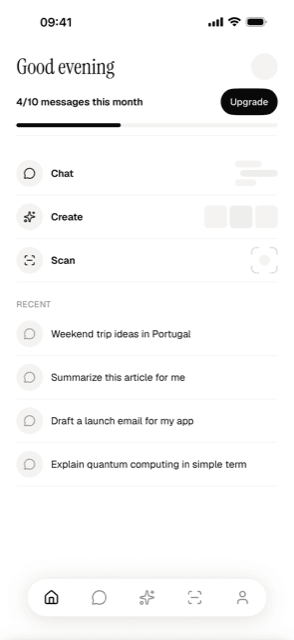
Changing the limit
Set the app’s allowance
Change freeMessagesPerMonth in supabase/functions/_utils/ai.config.json.
The plan card reads this value through config.js.
Match the server setting
The server uses AI_FREE_MESSAGES when it is set. Otherwise, it uses the JSON
value. If you set the secret during setup, update it to the same number:
supabase secrets set AI_FREE_MESSAGES="20"Replace 20 with the allowance you chose. Match AI_FREE_MESSAGES in
supabase/functions/.env when testing locally. Use a whole number of zero or
more; invalid values fall back to the JSON setting.
Redeploy the functions
Deploy the functions to include the updated JSON file:
supabase functions deploy chat
supabase functions deploy identify
Verify
Reload the app and check the plan card. With a free test account, send messages
or scans until the server refuses a new request with 402 quota_exceeded.
Confirm that the allowance matches the number shown in the app.
When someone hits the limit
The app calls presentPaywall('quota_exceeded'), which shows an upgrade sheet, or your
Superwall paywall if you’ve set one up under that same placement
name. Edit the sheet’s copy under paywall.* in src/i18n/en.json and update the
matching translations in src/i18n/de.json:
"paywall": {
  "quota_title": "You're out of free messages",
  "quota_body": "Upgrade to Pro for unlimited messages, image generation, and every model.",
  "quota_upgrade_cta": "Upgrade to Pro"
}
Checking Pro status
Pro means an active RevenueCat entitlement, checked in both the app and the server:
- The app gates its UI on
config.js→purchases.proEntitlementId. - The server checks the RevenueCat API for the entitlement named by
PRO_ENTITLEMENT_ID.
Both default to pro. If your RevenueCat entitlement is also named pro, there’s nothing to configure.
Keep the entitlement names the same. Otherwise, a paying user may see Pro features in the app while the server refuses access. See function secrets.
Without REVENUECAT_SECRET_KEY, the server treats every user as non-Pro. Image
generation and image-output chat models are unavailable, including for paying users.
Removing the limit
You can raise the allowance or remove the server check. Choose a higher allowance if you still want a monthly limit.
Raise the allowance
Follow Changing the limit and set a higher number in both the app configuration and any server override.
Remove the server check
Remove the assertQuota calls and imports from supabase/functions/chat/index.ts
and supabase/functions/identify/index.ts, then redeploy both functions. Update
the plan card so it no longer presents a limit you do not enforce.
Removing this check lets any signed-in user make unlimited chat and scan requests against your OpenRouter account. Keep another spending control in place before shipping that change.
Verify
A free test account can make requests beyond the previous allowance. Image generation and image-output chat models still require Pro.
How usage is counted
count_monthly_usage counts stored user messages and scan results created during
the current month. Deleting that history reduces the count. Retrying the last
unanswered chat message reuses its stored row, so it does not add another message
to the count.
Chat saves the user message before requesting a reply, so a failed provider request can still use the allowance. Scan saves its row only after identification succeeds.
The server checks usage before saving a new request. Concurrent requests can pass the check before either is saved, so the allowance is not a strict spending cap.