Image generation
The Create tab generates an image from your prompt, style and aspect ratio.
It uses the generate edge function.
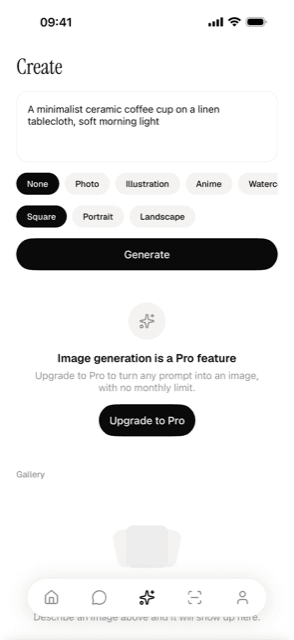
Change presets, ratios or the model
| To change | Edit | Then |
|---|---|---|
| Style presets | stylePresets in generate/config.json | Redeploy generate |
| Aspect ratios | aspectRatios in generate/config.json | Redeploy generate |
| The model | generateModel in generate/config.json | Redeploy generate |
All three are defined in one file, supabase/functions/generate/config.json, which the
Create tab also reads for its chips. The client sends the user’s prompt and the
selected style and aspect-ratio IDs. The function looks up the prompt suffixes for
those IDs in the same file. An unknown ID contributes an empty suffix, so redeploy after
adding a preset or ratio.
Adding a style preset
Add it to generate/config.json
{ "id": "noir", "label": "Noir", "promptSuffix": ", black and white film noir, hard shadows, high contrast" }Redeploy
supabase functions deploy generateVerify
Check that the new chip appears and test it with a prompt. If its suffix seems
to have no effect, confirm that the ID matches and that generate was redeployed.
Changing the model
Pick a slug from openrouter.ai/models whose output modalities include image, then redeploy:
"generateModel": "google/gemini-3.1-flash-image"A model from a different company changes who receives the user’s content, so bump
consentVersion as well; see AI consent.
Gotchas
Without REVENUECAT_SECRET_KEY, the server cannot confirm Pro status and
refuses generation for every user. See
Secrets.
Aspect ratios are approximate. The function adds the ratio to the prompt as text; it does not request exact pixel dimensions.
Generations require Pro and do not count toward the monthly chat and scan allowance. See Quota and paywall.
Saving an image to the device asks for permission to add to the photo library, not to
read it. On Android, app.config.js configures expo-media-library with
granularPermissions: [] and blocks READ_MEDIA_VISUAL_USER_SELECTED, so the
manifest declares none of READ_MEDIA_IMAGES, READ_MEDIA_VIDEO and
READ_MEDIA_AUDIO. Google Play accepts those only from apps whose core use needs
them. If you add code that reads the library itself instead of using the system photo
picker, list the types you need in granularPermissions (photo, video, audio),
remove the blocked permission and file the declaration described in
Play’s photo and video permissions policy .
Error codes
| Code | HTTP | Meaning |
|---|---|---|
invalid_request | 400 | The prompt is empty or the request body has the wrong shape. |
unauthorized | 401 | The Supabase access token is missing or invalid. |
ai_consent_required | 403 | The user has not allowed AI, or allowed an older consent version. The app shows the consent card. |
pro_required | 403 | Not a Pro user, or REVENUECAT_SECRET_KEY is unset. |
no_image | 502 | The model replied without an image. |
provider_not_configured | 500 | OPENROUTER_API_KEY isn’t set. |
internal_error | 500 | An unexpected server or provider error. Check the function logs. |
Files
- create.tsx - Create route
- CreateScreen.tsx - Create screen
- generateImage.ts - Request and response types
- repository.ts - Generation queries
- StylePresetChips.tsx - Style selection
- AspectRatioChips.tsx - Ratio selection
- GenerationResultCard.tsx - Result display
- generations.ts - Gallery queries and the generate mutation
- index.ts - Generation handler
How it works
generateImage() accepts prompt, style and aspectRatio strings. It sends a
non-streaming request and returns the saved image’s path, its row id, and the
prompt, model, style, aspect ratio and creation time. The image bytes are uploaded
to Storage rather than returned in the response.
The generations table is owner-scoped by row-level security. Images are stored as paths rather
than signed URLs, because signed URLs expire, and get signed again on demand when the
gallery renders.